


How to Clean Up Product Photos without Paying Per Image

Etsy sellers know that good product photos sell items, and
messy backgrounds do not. A cluttered desk, a wrinkled sheet, or a shadow in
the corner can make an otherwise great product look unfinished. The usual fix
is a background removal tool, but most of those tools want you to upload each
photo, burn through a credit limit, or pay a monthly fee just to keep your shop
looking clean.
Creative Fabrica Studio Desktop takes a different approach.
It is a free Windows and Mac app built around a background remover for Etsy product photos, along with an image upscaler and a few
other creative tools, all running on your own computer instead of a remote
server.
What Is Creative Fabrica Studio Desktop?
Creative Fabrica Studio Desktop is an app that pairs
Creative Fabrica Studio with AI models installed directly on your own computer.
Instead of sending a photo out to a server and waiting for it to come back,
supported tools such as background removal and upscaling can run right on your
device once the model is set up.
It is worth being clear about what this means in practice.
Not every feature in Studio is guaranteed to run without an internet connection
at all times. What can be said with confidence, based on testing the app
directly, is this: after the model is installed, supported local tools can run
on your computer. That is a fair claim, rather than a promise that the whole
app works with no connection in every case.
Why Local AI Tools Matter for Etsy Sellers
Running an Etsy shop already means juggling photos, listings,
orders, and customer messages. Local AI tools help cut down on one part of that
load.
1. No need to upload every product photo to a cloud tool
before you can clean it up.
2. No credit system charging you each time you remove a
background or fix an image.
3. A real help when you are prepping many listing photos at
once for a new product drop.
4. A better fit if you prefer keeping your product photos
off outside servers.
5. Useful when your internet connection is slow, since the
work does not depend on upload speed.
6. Built right into the Creative Fabrica Studio setup, so
there is one less tool to manage.
None of this means cloud tools have no place in an Etsy
workflow. It simply means Etsy sellers now have a free, local option sitting
right next to the tools they may already use.
Removing the Background From an Etsy Product Photo
Here is a common task for Etsy sellers preparing a new
listing. You have a photo of your product shot at home, maybe on a table or a
plain sheet, and you need a clean background before it goes live on your shop
page.
1. Open Creative Fabrica Studio Desktop, choose the
background removal tool and download the model.
2. Drop in a photo of your product shot.
3. Let the local model process the image on your own
computer.
4. Save the result as a transparent PNG, ready for your
listing or a mockup.
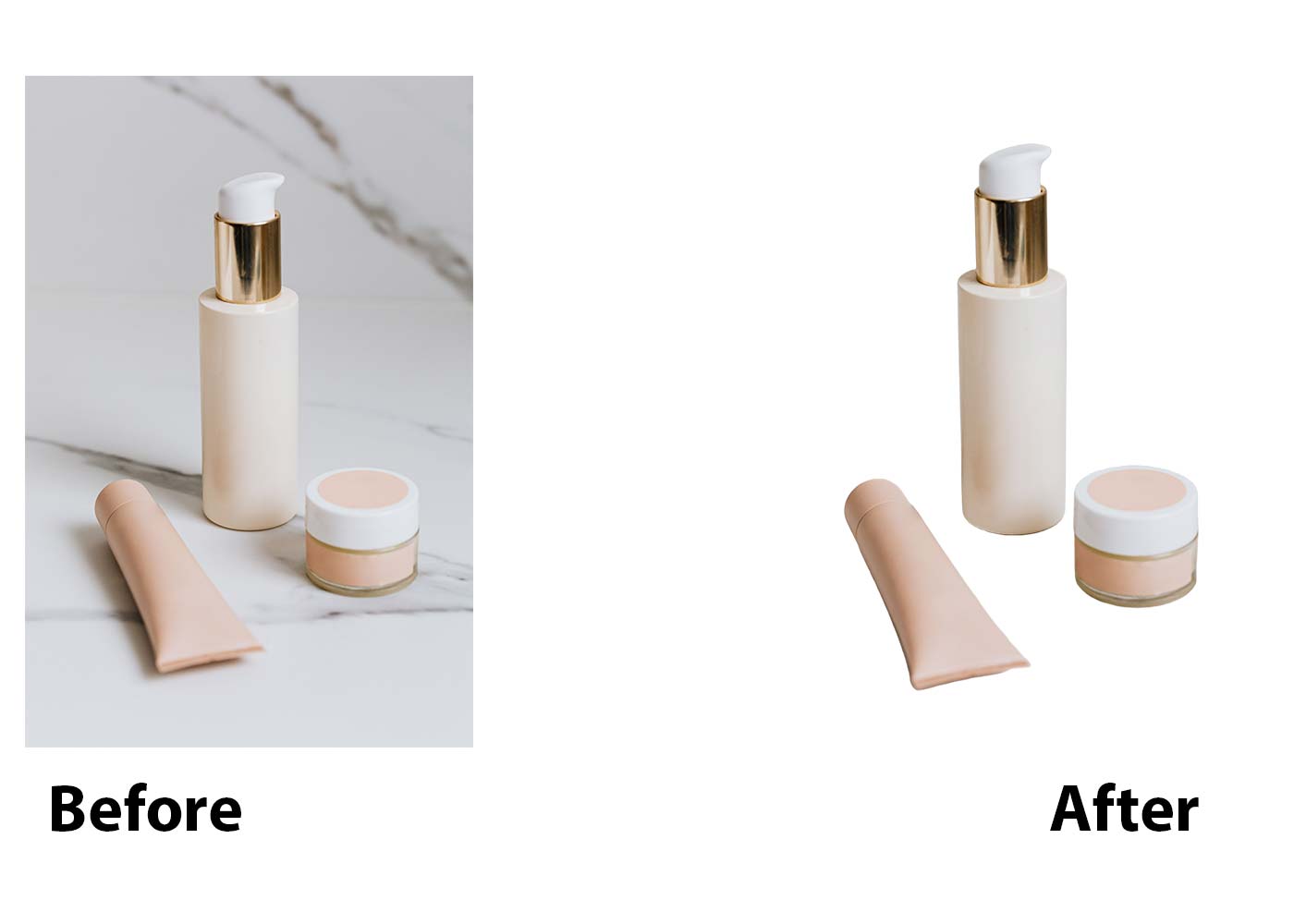
The result is a clean, professional looking product shot
with no background clutter, ready to drop straight into a listing. Because the
work happens locally, you can run through a whole batch of new photos without
watching a credit count drop.
Who Is This App Best For?
Creative Fabrica Studio Desktop fits a wide range of Etsy
shop needs. It is worth trying if you are one of the following.
1. An Etsy seller who photographs your own products at home.
2. A shop owner who lists many new items each month and
needs consistent photos.
3. A print on demand seller preparing mockups for a listing
page.
4. A small business owner selling through Etsy alongside a
personal website.
5. A crafter who wants clean product shots without hiring a
photographer.
If any of that describes your shop, the app is worth a look,
since it costs nothing to try.
Pros and Limitations
No tool solves everything, so it is worth looking at both
sides honestly.
Pros:
1. Free local AI tools, with no credit card needed to get
started.
2. Works on both Windows and Mac.
3. Useful for background removal and image upscaling, two
common needs for Etsy listings.
4. Built directly into the Creative Fabrica Studio setup,
instead of a separate paid program.
Limitations:
1. Performance depends on your computer, so an older machine
may run slower.
2. Models need to be downloaded before you can use them for
the first time.
3. Some features may still need an internet connection or a
Creative Fabrica account, depending on the task.
Being upfront about the limits of a tool builds more trust
than pretending it can do everything, and that is the goal here.
Frequently Asked Questions
Is Creative Fabrica Studio Desktop free?
Yes. The app does not require a paid account or credit card
to install and use the local tools.
Does the background remover run locally?
Yes. Once the model is installed, the background remover can
process images on your own computer.
Does it work on Windows?
Yes, the app is built for Windows computers.
Does it work on Mac?
Yes, the app also runs on Mac computers.
Can I use it for Etsy product photos?
Yes. Many sellers use the background remover to clean up
product photos before a listing goes live.
Can I use it for print on demand mockups?
Yes. The upscaler and background remover both help prepare
files for print on demand listings.
Does it upscale images too?
Yes. The app also includes an image upscaler that runs on
your own computer once set up.
Is it an alternative to paying for background removal credits online?
It offers a free local option that sits alongside paid cloud
tools, giving you a choice depending on the listing.
Do I need an internet connection?
You need one to download the app and the models the first
time. After that, supported local tools can run without a constant connection.
Are my photos uploaded anywhere?
For the local tools, photos are processed on your own
computer rather than sent to an outside server.
A messy background can quietly cost an Etsy seller sales,
one listing at a time. If that has ever happened to your shop, these free AI tools for Etsy sellers
are worth installing and testing on your next batch of product photos.





Comment on this article.